Features

Employee Schedule Web View

Employee APP Schedule View

These can be listed with changed at a level of granularity for useful forensics i.e. which manager created and / or changed them...
Employee Schedule Web View
Online Employee Scheduling
Easily create, update, and manage employee schedules from any device, in real time. Assign shifts, balance workloads, and fill coverage gaps quickly to ensure smooth operations. The system helps prevent scheduling conflicts, reduces manual errors, and ensures your team is staffed efficiently at all times. Control Notifications so the Right Manager is aware & can act on any requests, changes & more!

Log & Search by keywords to ensure Issues are addressed
Log & Search by keywords to ensure Issues are addressed
Manager's Log (daily shift notes)
Maintain a comprehensive record of daily shift activities, incidents, and important updates. Managers can review previous entries to monitor team performance, track recurring issues, and make informed decisions that improve productivity and accountability.
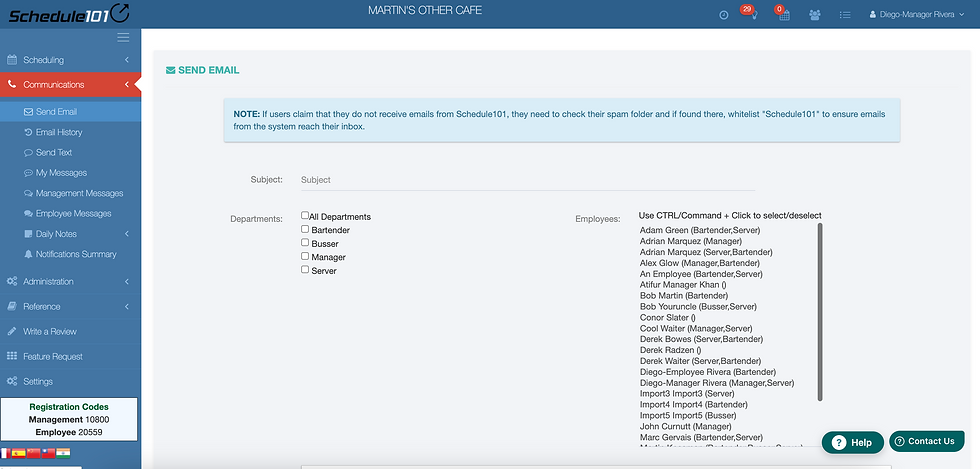
Send Email by Department with the ability to add other Employees

Send Texts by Department with the ability to add other Employees
Send Email by Department with the ability to add other Employees
Employee & Management Messaging
Communicate seamlessly with your team through the built-in messaging system. Send announcements, reminders, or urgent updates directly to employees, departments or specific groups, keeping everyone informed and aligned without relying on scattered emails or phone calls.

At a glance view of who are receiving SMS Texts & / or Emails for what.

Optional SMS Texted system generated notifications. Note that schedules are sent in their entirety.

At a glance view of who are receiving SMS Texts & / or Emails for which Departments & Type of Notification: Request Time off Add, Swap or Drop shifts Change Availability Notifications or Request to change Self-Registrations (New Employees) Clock-In Related Clock-Out Related.
At a glance view of who are receiving SMS Texts & / or Emails for what.
Text and Email Alerts
Keep your team up-to-date with automated notifications for schedule changes, shift reminders, or company announcements. This feature reduces confusion, prevents last-minute callouts, and ensures that critical information reaches employees instantly.

Last years sales if entered (next screen) or coming soon pulled from an external system such as a POS Point of Sales help drive this year's projections as we match day of week from year to year.


Sales can be marked up by day as well, overridden or if actual projections are imported, will be and can always be over-written. Weather indicators help with this last option. The Bottom Line is that the Bottom Line can always be over-written.
Last years sales if entered (next screen) or coming soon pulled from an external system such as a POS Point of Sales help drive this year's projections as we match day of week from year to year.
Sales Projections Tool with Daily Weather Forecasts
Plan staffing levels more effectively by combining historical sales data with weather-based projections. Anticipate high-demand periods, optimize labor allocation, and make strategic decisions that maximize revenue while minimizing overstaffing & most importantly, avoiding understaffing or staffing in the wrong departments.

for the Location & Department changes in real-time as the schedule is written.
for the Location & Department changes in real-time as the schedule is written.
Labor % Indicator
Monitor labor costs as a percentage of sales in real time to maintain profitability. Quickly identify trends, prevent overspending, and adjust schedules to balance operational efficiency with service quality.

Get things Done!
Get things Done!
Repair & Maintenance Log
Track maintenance schedules, repair requests, and completed tasks to ensure equipment remains operational. Reduce downtime, prevent costly repairs, and maintain a safe, efficient work environment for your team.

There are two (2) of these. One for Confidential Managers only Documents & another for Managers to upload & keep current for Employee Access. Physically, checked for malware on the upload: Excel, PowerPoint, PDF, videos, for whatever you need your staff to have access to: Government Forms, information about their jobs / tasks, policies, procedures, uniforms, tests etc.
There are two (2) of these. One for Confidential Managers only Documents & another for Managers to upload & keep current for Employee Access. Physically, checked for malware on the upload: Excel, PowerPoint, PDF, videos, for whatever you need your staff to have access to: Government Forms, information about their jobs / tasks, policies, procedures, uniforms, tests etc.
Online New-Hire Training
Simplify onboarding with structured online training modules. New employees can complete training at their own pace, learning company procedures, policies, and job responsibilities quickly, which accelerates productivity and ensures consistent performance across the team.

Clock-in / out via APP or Web browser, is schedule-enforced and geo-fenced so Employee is where they are supposed to be when doing so...

schedule-enforced, geofenced clock-in & out with extensive controls, settings, notifications to support Manager exceptions

these are only Some of them...
Clock-in / out via APP or Web browser, is schedule-enforced and geo-fenced so Employee is where they are supposed to be when doing so...
Schedule-Enforced Clock-In & Out
Ensure employees adhere to their scheduled shifts by enforced, geofenced clock-in & out controls. Exceptions require Management Approvals. Notifications go to the Boss's who opt-in via in-app messages, email or option SMS texts. Clock-features if set-up & managed well, pay for themselves within days. Reduce time theft, minimize payroll errors, and ensure that every shift is covered as planned.

Reported figures, additionally driving Revenue Projections same day of the week next year via the Sales Projections Tool, used for Labor % Scheduling.

Daily Shift-based, Roster / Line-up Report accessible from Schedule page or Side-Menu followed by summaries (next image)

View Monthly (or Yearly summaries)
Reported figures, additionally driving Revenue Projections same day of the week next year via the Sales Projections Tool, used for Labor % Scheduling.
Financial Reports
Access comprehensive financial reports detailing labor costs, sales performance, and overall business metrics. Use these insights to make informed decisions, identify trends, reduce costs, and optimize operational efficiency.

Request it & as a Manager Search for them


Request it & as a Manager Search for them
Integrated Time-Off Requests
Employees can submit time-off requests online while managers retain control to block critical dates. This ensures adequate staffing levels, avoids conflicts, and keeps operations running smoothly during peak periods.

View their shifts for all or one venue at a time. Switching between venues results in unique information for each location.

Identical functionality whether via the app or web browser views. Schedule view is just oriented for a mobile (phone). The rest is screen responsive so it's easily viewed and accessed via a mobile device.

view comparison (APP vie)
View their shifts for all or one venue at a time. Switching between venues results in unique information for each location.
Multiple Location Access
Oversee scheduling, shifts, and employee data across multiple locations from a single centralized account. This feature simplifies multi-site operations and ensures consistent staffing standards across all locations.


in RED - selectable to go directly to see what they need to schedule for or do to prep for it.

Details to remind various staff members to schedule & prepare properly for any events
Event Calendar
Organize and share company events, meetings, and deadlines with your team. Keep everyone informed and engaged, improving coordination and ensuring no important date or task is overlooked.

Entered by employee, details by shift show up on Scheduling Grid as hover-over information to guide Managers. Viewable & Editable by Managers in Employee Record as well.

Managers Cannot over-ride other shifts (gold), other shifts in other venues (pink - if they have access to switch venues there is hypertext otherwise they need to call the Manager of the other Location...), accepted Time-Off (blue), but can over-ride unavailable (grey) partially available (green - with hover-over details). The Employee "i" includes quick access details including email address, phone number etc. to contact the Employee, highly recommended when doing so...
Entered by employee, details by shift show up on Scheduling Grid as hover-over information to guide Managers. Viewable & Editable by Managers in Employee Record as well.
Employee Availability
View each employee’s availability directly in the scheduling grid. Quickly assign shifts based on real availability, reduce scheduling conflicts, and optimize coverage for each day.
Online Employee Files
Store employee records, certifications, and important documents securely online. Access files instantly for HR purposes, performance reviews, or compliance checks, eliminating paperwork and improving efficiency.

total hours change color to remind Managers if they exceed part-time or set overtime
total hours change color to remind Managers if they exceed part-time or set overtime
Over-time & exceeding part-time hi-lited
Receive notifications when employees approach or exceed scheduled hours. Control labor costs, prevent excessive overtime, and reduce employee fatigue by maintaining balanced workloads.

App & Mobile Optimized Employee Portal
Allow employees to access schedules, request shift changes, and stay informed from any mobile device. This improves engagement, communication, and flexibility, making workforce management easier for both staff and managers.


Depending on Settings Shift related messages are driven to Managers if permissions are required for either Drop, Swap or Add on shifts, other Employees first for any swaps, All in a Department after a Drop (approval if so required) & Managers that opt-in for messaging on any and All.
Swap, Drop & Add Request
Employees can request shift swaps, drops, or additions, and managers receive automatic notifications for approval. This streamlines shift adjustments, reduces conflicts, and ensures proper coverage at all times.

Employee Self-Registration
Simplify onboarding by allowing employees to register themselves in the system. Reduce administrative workload, accelerate access to schedules and training, and get new hires productive faster.

.jpg)

Experience the power
Built to simplify shift management, Schedule101 gives you full control over scheduling, task coordination, and team communication.
Streamline operations, reduce errors, and ensure every shift runs efficiently, so your business stays productive and your employees stay engaged.
Contact Us